Adventures in online learning

I spent much of this week producing and aggregating online content suitable for UU kids. I’ve been trying to keep up with my sister, Abby, who’s been recording read-aloud videos at a breakneck pace — some of her videos have their own dedicated playlists at the UUCPA CYRE Youtube channel: Alice’s Adventures in Wonderland, and The Wonderful Wizard of Oz. I’ve been posting Beth’s Aesop’s Fables on another playlist. Yet another playlist has Amy reading aloud The Secret Garden.

And I had enough time left over to make another video in the “Things To Make” series, as well as adding another episode to the ongoing “Back in Time — to the Year 29!” saga.
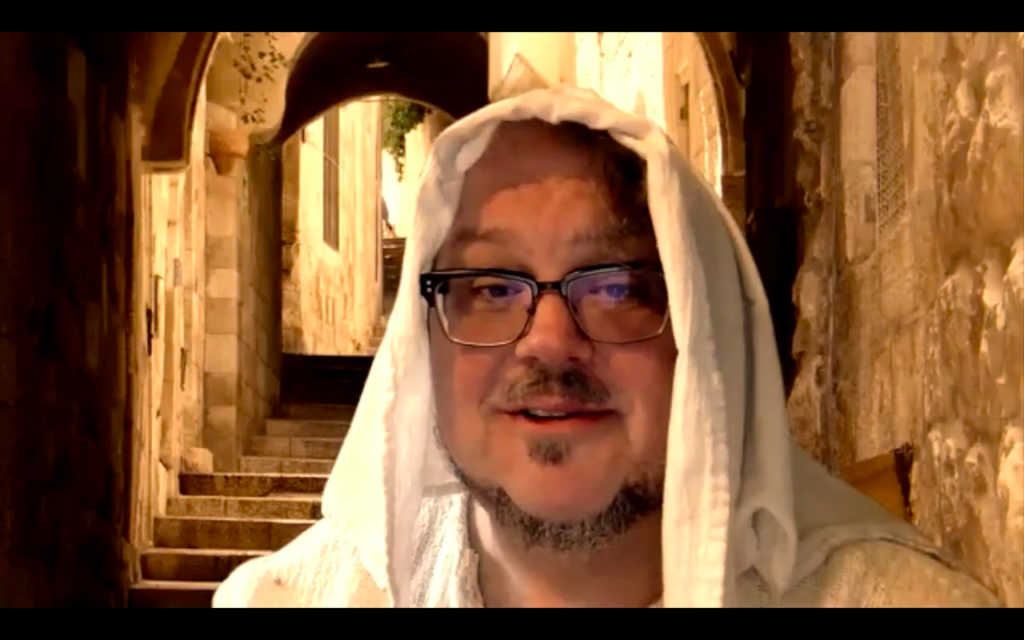
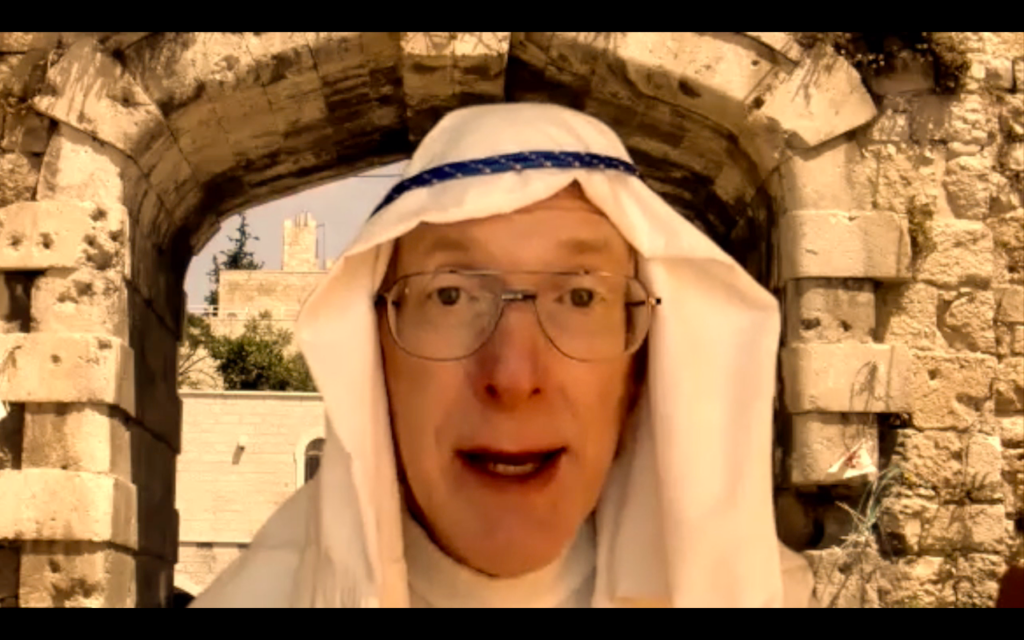
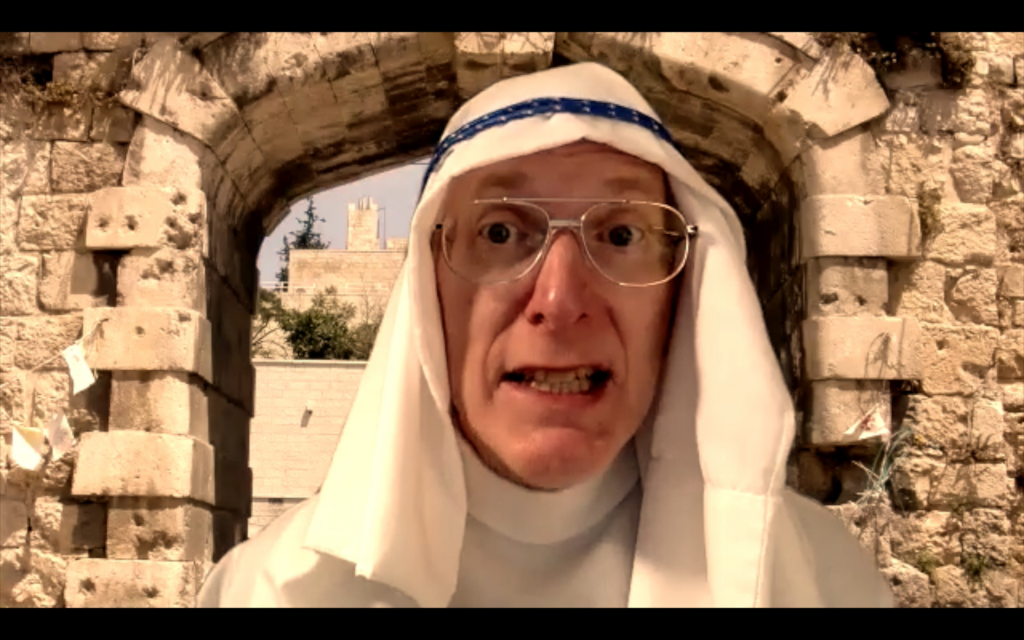
Barnabas (played by Greg Becker) in the latest installment of the “Back in Time” saga.

It’s not easy to figure out how to make good online religious education content in the era of COVID. First and foremost, parents tell me that they don’t want another lesson plan; they’re sick of helping their kids do online school lessons, they don’t need another burden. So that means the videos I post have to require minimal supervision from an adult. Second, religious education is always optional, which means it has to be fun or engaging or no one will watch it.

These two constraints mean I have to interpret “religious education” pretty broadly. How is listening to “Alice’s Adventures in Wonderland” religious education? Well, Unitarian Universalist religious education has always included the broad goal of supporting literacy; we want children to grow up thinking for themselves, and literacy promotes that in a number of ways. So while “Alice” doesn’t have any religious content per se, it’s a book that encourages literacy because it makes kids want to read.

And how is a series on “Things To Make” religious education? Well, the things I’m showing kids how to make promote independent play; they give kids a sense of agency; they cultivate creativity instead of consumption; and they have kids engage in hands-on embodied activities as a partial antidote to the disembodied lives many of us are now forced to lead online. This is rooted in good feminist theology: promoting embodied activities, promoting agency instead of passivity.

The “Back in Time” video saga could be considered religious education by almost any definition. (Yes, it would be considered rank heresy by many, but it’s still education on a blatantly religious topic.) The Aesop’s Fables series could certainly be considered moral education. But I think both showing kids how to make things, and reading aloud to kids, help us achieve some of the larger educational goals of Unitarian Universalist religious education.

Update, July 24: I’ve now added posts with links to the “Back in Time” series of videos on Youtube, as well as to subsequent video “Stories for All Ages.” The posts are backdated to the release date of the video, and include the full script for each video. You can see the entire series of posts here.
Adventures in creating online content

My younger sister the children’s librarian has inspired me. Her library is closed, or course, so she’s creating online content by uploading an average of a new video every day to the Harvard (Mass.) Public Library Children’s Room Youtube channel. So far, she’s got a simple craft project, story time that parents can do with young children, and she’s reading aloud the entire Alice’s Adventures in Wonderland.

I like several things about Abby’s videos. First, they’re a great supplement to Zoom calls — some of us are getting Zoom burnout, and it’s nice to be able to watch a video when YOU want to watch it. Second, they’re Goldilocks videos — not too long, not too short, but just the right length. Third, they don’t put a big burden on parents — the crafts project can be done by kids on their own without parental supervision, kids can watch the installments of Alice on their own, and the story time for young children has them doing what they’re going to be doing anyway which is sitting in a parental lap.

So I repurposed this Youtube channel, where I already had some religious education videos. I added a video we used in last Sunday’s service. I created a couple of playlists, one for crafts (Abby’s craft video is included there), and another for story time (Abby’s Alice stories are going there, because Alice in Wonderland is a sacred text). I’ve got a children’s librarian from our congregation half convinced to do a story time, I’m planning a story time (I think I’ll read aloud from an old edition of the Jataka Tales), there will be more crafts projects.

Blog readers, if you know of some videos that you think would be appropriate to share on this Youtube channel, please send me the links. I can’t promise to put everything up, but I’d really like to see your suggestions — send them to danharper then the little “at” sign then uucpa then a dot then org.

Back in time…

This Sunday, during our congregation’s online service, we’re going to go back in time…

…using the congregation’s time machine…

…to the year 29 C.E., to a small town in the land of Judea. There we will meet a fellow named Ishmael, who’s the kind of person who loves to spread rumors.

“They say,” says Ishmael, “that….”

If Ishamael lived today, he’d be the kind of fellow who emails you the latest internet conspiracy theory. But since he lives in the year 29 in Judea, he spreads his rumors face-to-face in the town’s marketplace. He meets up with a woman named Martha. When he learns that Martha’s brother Peter has joined the entourage of the famous rabbi Jesus of Nazareth, not surprisingly he has a few conspiracy-theory-type rumors to tell Martha. This causes Martha to wonder if her brother is going to be OK….

“Now you’ve got me wondering,” says Martha….

Our trip to the past will take less than three minutes, allowing us plenty of time for the usual singing, music, preaching, etc. The whole thing will be livestreamed on the Facebook page of the Unitarian Universalist Church of Palo Alto, this Sunday at 9:30 and 11.

An obscure Unitarian in the 1918 pandemic

Helen Katharien Kreps was a Unitarian theological student who died of influenza in 1919.

She was born Oct., 1894, in North Dakota, when her father was based at Fort Totten, then on the Indian frontier. Since her father was a military officer, the family moved frequently in her first ten years; her younger brother was born in Nebraska, and in 1900 the family was living near San Diego.

At the time of the 1906 earthquake, her father was based in Fort McDowell, Calif., though it is not clear if his family was with him. The family must have been in Palo Alto for at least part of 1910, for Helen attended the Unitarian Church of Palo Alto when Rev. Florence Buck was filling in for Rev. Clarence Reed. Helen, then in high school, was deeply influenced both by Unitarianism, and by seeing Florence Buck, a woman, in the pulpit.

Later in 1910, Helen and her family were living at Cape Nome, Alaska. But Helen returned to Palo Alto to enter Stanford in the 1911-12 academic year. She worked as a filing clerk in the Stanford library beginning in 1912. While at Stanford, Helen majored in German, and participated in the summer, 1914, session of the Marine Biological Library. She was elected president of the Stanford English Club.

In 1915, she graduated from Stanford with high honors, and worked in the Stanford library in 1915-1916. She taught the first and second graders in the Sunday school at the Unitarian Church of Palo Alto in that same year. She made regular financial contributions to the church in 1916, after which the notation “discontinued thru removal” (meaning she moved away) appears under her account.

In the fall of 1916, Helen entered the Pacific Unitarian School for the Ministry. There she showed impressive intellectual gifts. Earl Morse Wilbur, the president of the school, also remembered Helen’s exceptional character:

“Quiet and modest in bearing though she was, never asserting herself or her views, yet we instinctively felt that in her there was depth and breadth of character, and as she moved about among us she won a respect and exerted an influence that belong to few. I remember saying to myself at the end of her first chapel service, in which the depth and sincerity of her religious nature were revealed, that I should count myself happy if she might sometime be my minister; and those who were present at the devotional service which she conducted at the Conference at Berkeley last spring will not soon forget the impression she then made.”

During the summer of 1918, Helen supplied the pulpit of the Unitarian church in Santa Cruz, returning to the Pacific Unitarian School for the Ministry in the fall. She was well on her way to receiving her degree summa cum laude, when the world-wide influenza epidemic struck the Bay Area in October, 1918. In March, 1919, Earl Morse Wilbur reported the following in the Pacific Unitarian, the West Coast Unitarian periodical:

“It happened that Miss Kreps and Miss [Julia] Budlong [another theological student] had last year both taken a University course in Red Cross nursing; and when the emergency call came for nurses to care for the hundreds of victims on the campus they both volunteered without a moment’s hesitation. It was expected that the trouble would be over and that they would return to work within two weeks. Instead they paid as dearly for their patriotic service as many soldiers have done. Both were soon stricken with the influenza. … Miss Kreps’s case developed a dangerous attack of pneumonia, and for weeks her life hung in the balance; and she is even yet in the military hospital in San Francisco, slowly regaining her strength, and will be unable to return to her studies before next autumn….”

But Helen did not recover, and in the same month, March, 1919, the Pacific Unitarian carried Earl Morse Wilbur’s obituary for Helen, who had died Feb. 23, 1919, at the Letterman General Hospital in the San Francisco Presidio.

Her death is an example of what we hope will not happen during the current pandemic: we hope we don’t wind up with well-intentioned but barely trained people serving as nurses in makeshift hospitals, hospitals hastily set up to deal with an overwhelming number of sick people.

Notes: 1900, 1910 U.S. Census; M.H.T., “Jacob F. Kreps,” West Point Assoc. of Graduates, http://apps.westpointaog.org/Memorials/Article/3011/ accessed Nov. 18, 2016; Annual Registers, Stanford University, 1912-1915; Stanford Daily, Dec. 3, 1914; Earl Morse Wilbur, “Our School for the Ministry,” Pacific Unitarian, March 1919, p. 63; Earl Morse Wilbur, “Helen Katharine Kreps,” Pacific Unitarian, March 1919, pp. 65-66; Stanford Daily, Feb. 25, 1919.

The mystery of the misattributed hymn

One of my favorite hymns about peace begins:

Years are coming — speed them onward!
When the sword shall gather rust,
And the helmet, lance, and falchion,
Sleep at last in silent dust!

This hymn has mostly been reprinted in Universalist and Unitarian Universalist hymnals, and it is usually attributed to the Universalist minister Adin Ballou, who founded the utopian Hopedale community in Milford, Massachusetts, in 1842. Ballou and the members of the Hopedale community were believers in women’s rights and abolition and temperance and education and pacifism. Recently, while I was researching family history, I discovered that my mother’s great-grandparents Nathan Chapman and Hepzibah Whipple left the utopian Rogerenes of Ledyard, Conn., to join the nearby utopian Hopedale community in Massachusetts; and their daughter Jeannette was married in Hopedale to her husband Richard Congdon by none other than Rev. Adin Ballou; and though by the time of this marriage the Hopedale community had gone bankrupt, the spirit of the community lived on in the Hopedale Unitarian church of which Ballou was the minister.

Not only did this family history help explain why I’m a feminist, pacifist, educator, and utopian dreamer, but I decided it must explain why I like this hymn so much.

Except that Adin Ballou didn’t write this hymn.

Continue reading “The mystery of the misattributed hymn”

It’s not the evangelicals, it’s the Christian nationalists

In an interview on the Religious Studies Podcast, journalist Katherine Stewart points out that it’s wrong to identify all Christian evangelicals with the Trump White House. Stewart’s research shows that the Trump White House uses religion to mobilize voters to support them — specifically, mobilizing voters around abortion and opposition to same sex marriage and LGBTQ+ rights. She calls this a political movement, which she names “Christian nationalism.”

When pressed by the interviewer, David McConeghy, Stewart elaborates on why Christian nationalism is fundamentally about politics, not about religion. Speaking of one of the leaders of the movement, Ralph Drollinger, Stewart says:

“The policies he’s promoting are: deregulation; sort of a compliant workforce; a lack of basic workers’ rights; I think he’s called the flat tax something like ‘God’s form of taxation.’ And you know, this is all music to the ears of the funders of the movement. Many of the funders are these members of plutocratic families … the DeVos and Prince families, the Green family. And these very hyper-wealthy families rely on minimal workers’ rights, and economic and environmental deregulation to maintain and increase their profits. So the movement is promoted to the rank-and-file as being about these culture war issues. But when movement leaders are talking amongst themselves, or to political leaders, the message is much more expansive.”

Stewart also believes, based on her research, that Christian nationalism as a political philosophy is basically opposed to representative democracy; yet the Christian nationalists are also very sophisticated at manipulating the electorate to get their supporters into positions of leadership and power.

For these and other reasons, Stewart asserts that this is a political movement, one that uses religion for its own ends. I think this is a helpful way of looking at electoral politics in this election year: rather than being distracted by the red herring of Christian evangelicals getting involved in politics, we would do better to pay attention to the manipulation of the electorate by the political force of Christian nationalism.

Make yourself look good on camera

With the shelter-in-place order, any socializing we do is on camera. Plus many of us have to use videoconferencing for work. As long as we’re going to be spending lots of time on camera, we might as well look our best. So here are some tips for making yourself look good on your laptop’s (or your phone’s) crappy little web camera.

First of all, and perhaps most importantly, have your laptop or phone sitting on something stable. Ideally, you want to move the camera as little as possible, for two reasons. First, if you’re in a videoconference, you want to focus attention on your face, and if you move the camera around that’s going to be a distraction. Second, unless you have a really fast internet connection you probably want to save bandwidth; if you have a stable backdrop, that will be less information you’re sending out, and so you’re less likely to have degraded audio or video.

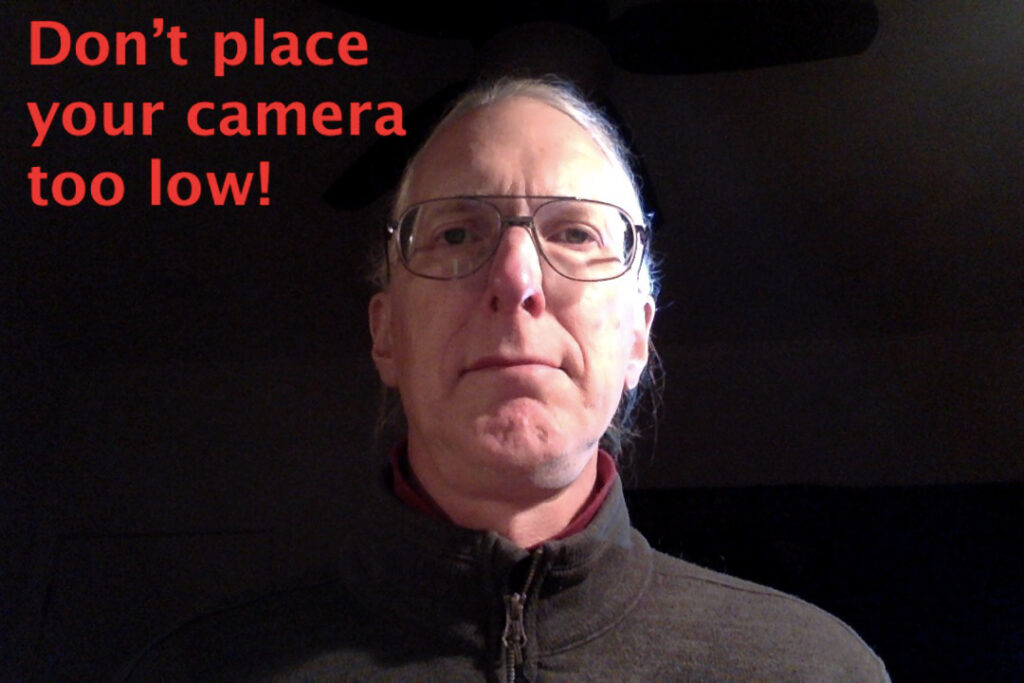
Second of all, don’t place your camera too low. If your camera is too far below your face, people will be looking up your nose, and if you’re middle-aged they can see all those incipient jowls that you’ve been trying to hide. In other words, don’t do this:

Camera placed too low, and only one source of lighting

Boy, do I look ugly in the photo above! Don’t make yourself look ugly. Place your computer or phone so that the camera is about at the level of your chin. However, don’t place your camera too high; there’s a psychological disadvantage to giving your viewers the impression that they are higher or taller than you.

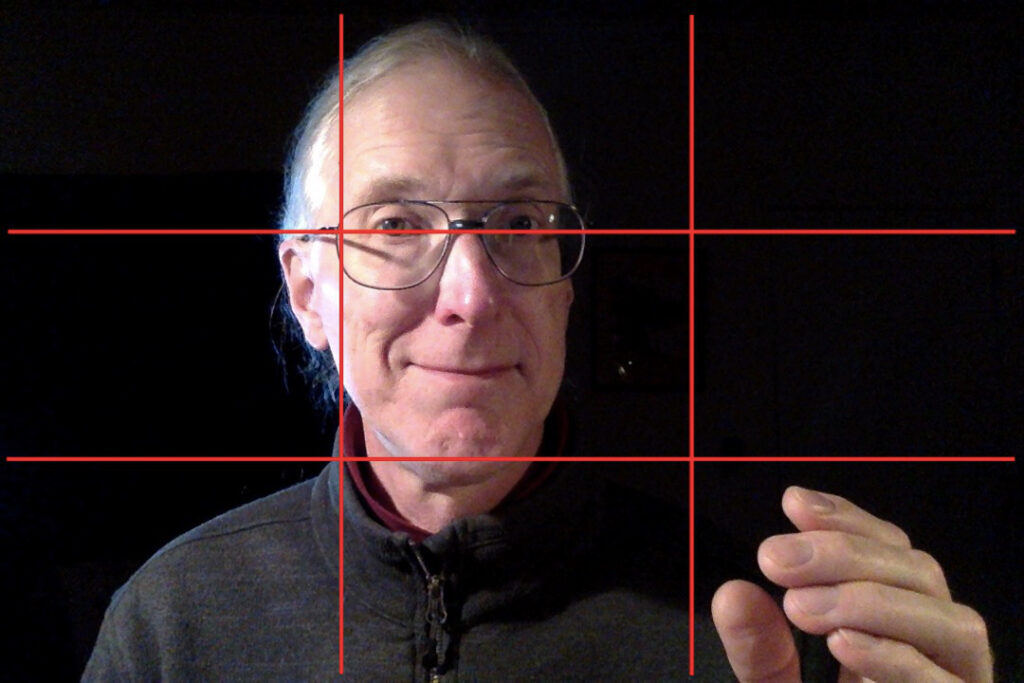
In addition, learn about the Rule of Thirds. Imagine that your screen is divided in thirds both horizontally and vertically, sort of like a tic-tac-toe board. Have your eyes placed so that they’re about a third of the way from the top of the screen. Move so that your head is NOT in the center of the frame, but about a third of the way to one side (I like to move to my left, so that my right hand, my dominant hand, can make gestures in the space to my right). Setting up your camera using the Rule of Thirds will make you look more professional, because that’s what we’re used to seeing in movies and on television.

Use the Rule of Thirds to place yourself in the frame of the camera

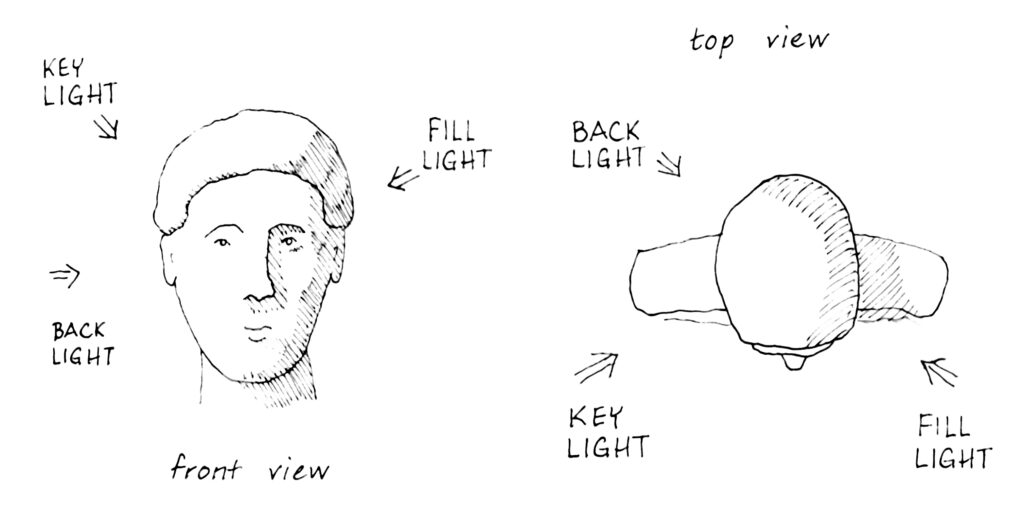
Now let’s take a look at lighting. In movies and television, they use what’s called “three point lighting.” That just means that they use three light sources to light someone’s head. First, you set up the “key light,” which is the most important light. If you’re at home and on a videoconference during the day, your key light is most likely determined by the nearest window — in that case, try to sit so that the light from the nearest window is coming towards you at about a 30 degree angle — and you want diffuse daylight, so make sure there’s a curtain or something to give diffuse light. At night, sit so that the strongest light in the room becomes your key light.

With only the key light, your head will look a little one dimensional or washed out; and if you have any wrinkles or blemishes, they will tend to stand out. Therefore, you need to set up another light, called the “fill light,” which will fill in the stark shadows cast by the key light. The fill light should be less bright than the key light. The drawing below shows where the key light and the fill light come from:

Diagram of three point lighting

Then if you want really professional lighting, you’ll add what’s called a “back light.” This comes from the same side as the key light, and it lights up the back edge of your head. By lighting up that back edge of your head, it makes you look that much more three dimensional. However, it’s super time consuming to set up a back light, so I don’t bother when I’m on a videoconference.

Now here are some examples of what I look like with these different lights. Here I am with just the key light — it’s adequate, but pretty stark:

Continue reading “Make yourself look good on camera”

Further adventures in livestreaming

The shelter-in-place order has made livestreaming our church’s worship services a little more complex. We just had a tech rehearsal with worship leaders and tech support people each in their own locations, using Zoom as our basic platform. We have learned a lot since we livestreamed last week! Here’s a summary of what is currently working for us:

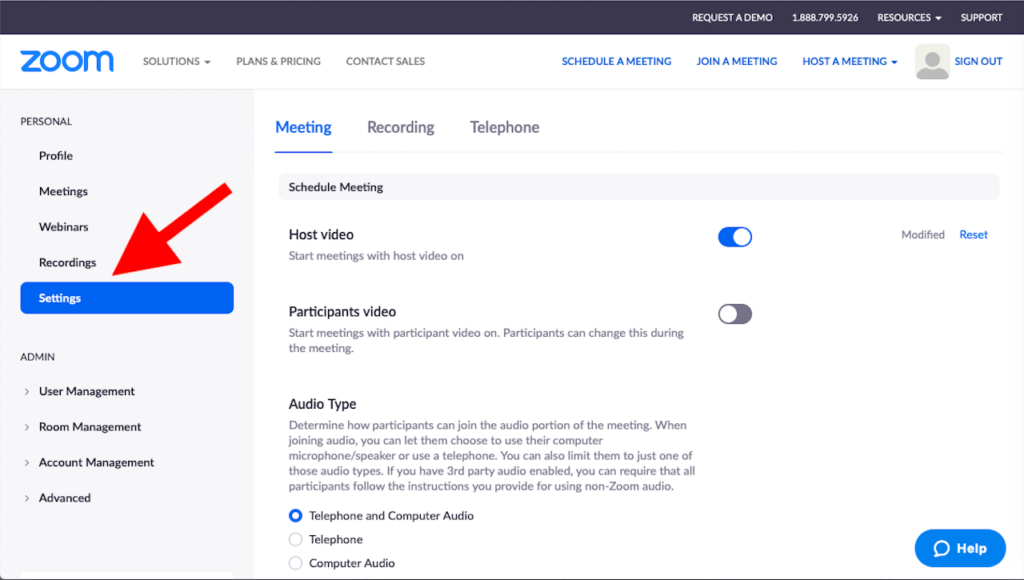
(1) Before the rehearsal, whoever owns the Zoom account needs to log in to their Zoom account and go over the settings carefully (see the screenshot below to see where to find “Settings” when logged in to Zoom). The critical settings you need to be aware of are as follows:
(a) Do not allow “Join before host.” This is to prevent someone from hijacking the feed with inappropriate screensharing before you take control.
(b) UNtick “Participant video: Start meetings with participant video on.” You want participant videos off, partly to prevent distraction, but also to prevent trolls from putting inappropriate content on their video feed. (Zoom will allow participants to start their video feed again, so you’ll also need someone to monitor participant videos during the service; see below.)
(c) Tick “Mute participants upon entry.”
(d) Tick “Allow co-hosts,” for two reasons: First, you’re going to need 2-3 people to manage the video feeds; second, make all worship leaders co-hosts because that puts them at the top of the participant list so you can more easily find them when switching back and forth between worship leaders and musicians.
(e) Tick “Allow host to put attendee on hold.” Just in case.
(f) Under “Screen sharing,” make sure you select the option where only allow host(s) can share screens. This prevents so-called “Zoombombing,” where trolls put up inappropriate images on your Zoom feed.
(g) Tick “Disable desktop/screen for users.”
(e) Tick “Allow users to select original sound in their client settings.” This improves the audio quality of musicians enormously.

(2) Well before the service starts, make sure you have email addresses for all co-hosts and worship leaders. Cell phone numbers would be a good idea too. If something fails, it’s nice to have a backup communication method besides private chat within Zoom.

(3) Start the Zoom call at least 15 minutes before the stated start time for the worship service, and make sure your co-host(s) who are managing participants also log in early. You want to have at least two hosts managing participants before the stated start time, when you’ll have your big influx of participants log in. Have your worship leaders log in early as well, and assign them co-host status so they appear at the top of the participants list.

(4) During the worship service, you’ll want people in the following tech roles:
(a) One host to “Spotlight video” of whichever worship leader or musician is on.
(b) One or two hosts to manage the participants. If you have a really small service (say, 30 or fewer participants logged in), you might be able to combine this role with the previous role.
(c) One or two people to work on audience engagement; these people will be monitoring the chat. Specific tasks might include monitoring chat for joys and sorrows (we’re going to allow joys and sorrows in chat); pasting hymn/song lyrics into chat at the appropriate moment; watching for newcomers to the service and perhaps greeting them privately in chat; generally monitoring behavior.
(d) Optional: we’ll also have a few knowledgable people monitoring audio and video quality, and providing feedback and/or advice as needed.

(5) Send out a script ahead of time. Our script, which was the basic order of service, proved to be inadequate. The primary worship leader (the senior minister in our case) is going to send out a full script, and our music director is going to insert cues for the host who’s in charge of switching the video feeds.

(6) We did a brief postmortem to talk about what worked and what didn’t work, and of course we’re doing email follow-up as well.

One final point: While putting on a worship service is always a team effort, it becomes even more of a team effort when you’re livestreaming (especially when everyone has to watch from home), because the tech crew becomes an integral part of the worship team. I consider this a major benefit of livestreaming services: in these times, when we’re all feeling a little isolated and scared, being a part of a team effort can be quite comforting.